
Traveling to Thailand in 2026? The Thailand Digital Arrival Card (TDAC) is an electronic arrival form that replaces the paper TM6 arrival card.
This guide explains who needs to submit it, when to apply, the information required, and how to complete the registration through the official website before your trip.


Thailand Digital Arrival Card (TDAC): Overview & Requirements

What Is the TDAC?
The Thailand Digital Arrival Card (TDAC) is an online arrival form that replaces the paper TM6 arrival card. Eligible foreign travelers entering Thailand by air, land, or sea must complete it before arrival.
The TDAC is not a visa and does not replace any applicable visa requirements.
Who Needs to Submit the TDAC?
Foreign nationals entering Thailand, including children and infants, must submit a TDAC. Thai citizens and permanent residents are exempt.
Transit passengers who do not pass through immigration are not required to submit one.
When to Apply for the TDAC
How Many Days Before Arrival Should You Submit the TDAC?
You can submit your TDAC within three days before arrival, including your arrival date (up to 72 hours before entry). Applications cannot be submitted earlier.
Register through the official TDAC website. The application is free, and a new TDAC is required for each entry into Thailand.
Information Required for TDAC Registration
Prepare your passport, travel itinerary, accommodation details, and email address before starting your application.
Passport and Personal Details
You will need your passport details, full name, date of birth, nationality, and other personal information requested by the form.
Flight, Travel, and Accommodation Information
Prepare your arrival date, flight or transport details, travel purpose, and accommodation address in Thailand. Additional health information may be required depending on applicable health rules and your recent travel history.
After submitting the form, save the confirmation and QR code sent by email so you can access them when needed at immigration.
How to Register for the TDAC: Step-by-Step Guide
You can complete the Thailand Digital Arrival Card (TDAC) online in a few steps. Prepare your passport, travel details, and accommodation address before starting.
Step 1: Visit the Official TDAC Website
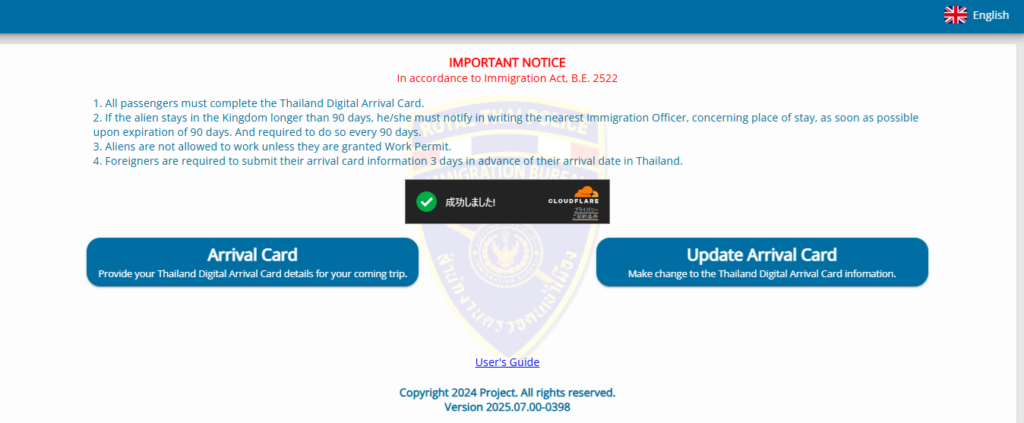
Open the official Thailand Digital Arrival Card website and select the option to submit an arrival card. You can choose an individual or group application.
The application is free. Make sure you are using the official government website.
Step 2: Enter Your Personal and Travel Details
Complete the form using the information requested, including:
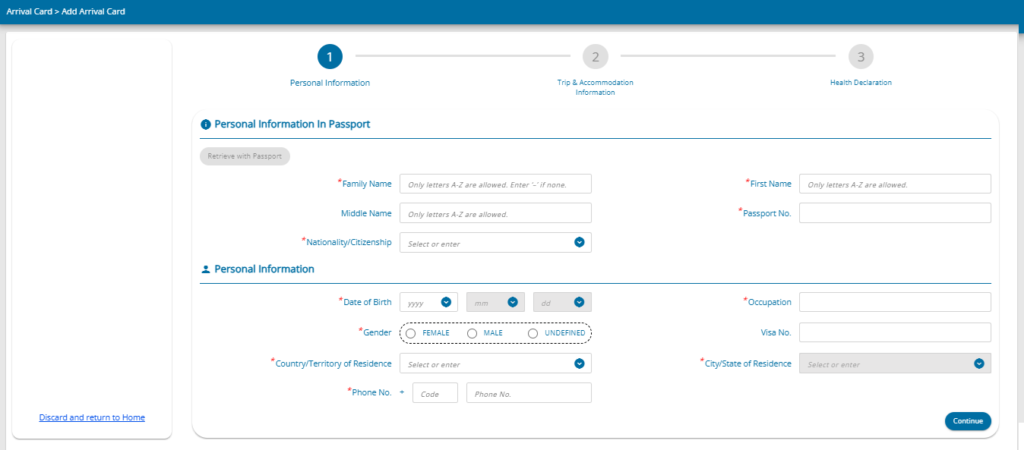
- Passport and personal details
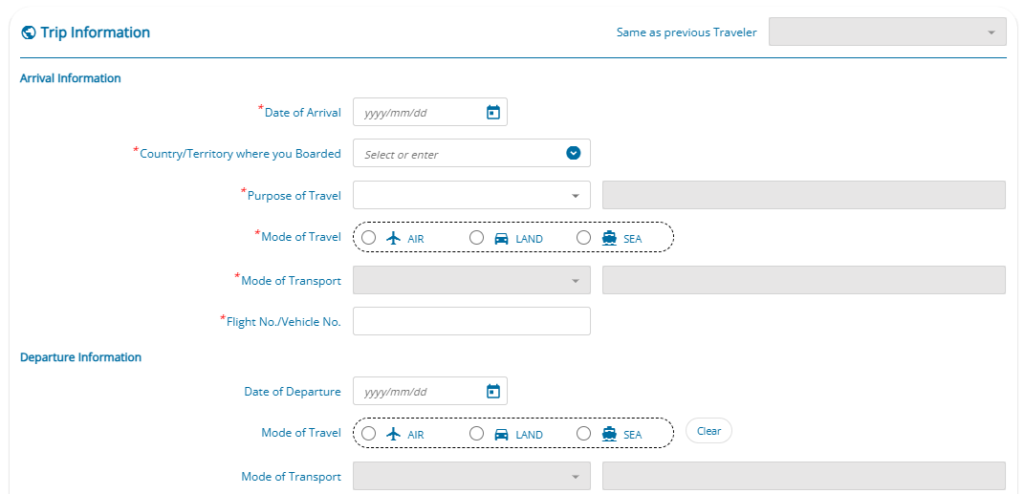
- Arrival date and flight or transport information
- Travel purpose
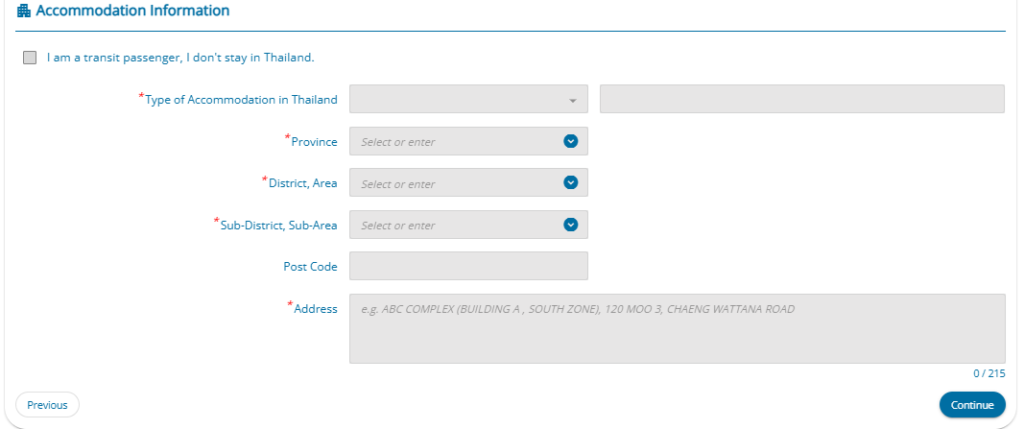
- Accommodation address in Thailand
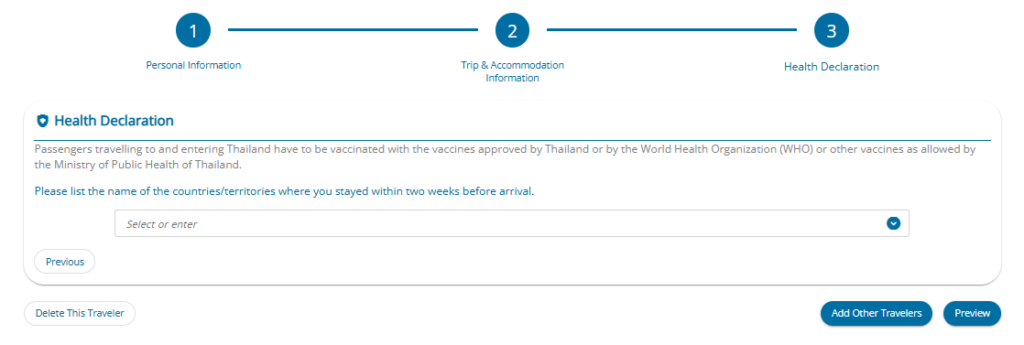
- Health declaration details, if required
Enter the details in English as instructed by the official system, and check that they match your passport and travel documents.
Step 3: Review and Submit Your Information
Review all details carefully before submitting the form. If you find an error, return to the relevant section and correct it before proceeding.
Enter an email address where you can receive your TDAC, agree to the terms and conditions, and submit your application.
Step 4: Save Your TDAC Confirmation
After submitting the form, download your TDAC confirmation and QR code. A copy will also be sent to your email address.
Save the QR code on your phone so you can access it at Thai immigration. Printing a copy is optional, but it can be useful as a backup.
If you do not receive the QR code by email, check your inbox and spam folder. If it is still missing, contact an immigration officer at your entry checkpoint for assistance.
What to Show at Thai Immigration

Do You Need to Print the TDAC Confirmation?
No. You do not need to print your Thailand Digital Arrival Card (TDAC). Save the confirmation and QR code on your phone so you can show them at immigration if requested.
You can also print a copy as a backup if you prefer to carry a paper document.
What to Do If You Make a Mistake or Cannot Find Your Confirmation
If you notice an error in your TDAC, use the official website’s Update Arrival Card function before entering Thailand. Some details, including your full name, nationality, and date of birth, cannot be edited, so you may need to submit a new form with the correct information. The latest valid submission will be used.
If you cannot find your confirmation email, check your inbox and spam folder, and see whether you can retrieve your submitted TDAC through the official website. If you still cannot access the QR code, contact an immigration officer at your entry checkpoint for assistance.
For updates or a new submission, use the official TDAC website.
Thailand Digital Arrival Card (TDAC) FAQ
Summary: Complete Your TDAC Before Traveling to Thailand
The Thailand Digital Arrival Card (TDAC) is a required online arrival form for eligible foreign travelers entering Thailand. Submit it within the three-day window before arrival, check your details carefully, and save your confirmation QR code.
Registration is free through the official TDAC website. Complete the process before your trip to help prepare for immigration.